Help & guide
New here? You’re in the right place. This guide assumes you’ve never used the app, and doesn’t assume you know much poker either. Read it top to bottom, or jump to a section.
What is PokerCoach?
PokerCoach is a place to play No-Limit Texas Hold’em against computer opponents and learn to play better, one hand at a time. Nothing here is for real money. Think of it as a practice gym: play as much as you like, then have a coach walk you through what you did well and where you went wrong.
Three things make it different from just playing cards against a bot:
- The opponents have real personalities that never change, so you can learn to read and beat them.
- Every decision is scored by a built-in analyzer (pot odds, position, sizing), with no opinion, just the math.
- An AI coach can talk you through any hand in plain English, and meets you at your level.
Quick start
Your first coached hand in five steps:
- Make an account and sign in.
- Go to Play and start a new game. You’ll be seated at a table with a few AI opponents and a stack of chips.
- Play the hand. When it’s your turn, buttons appear at the bottom: Fold, Check, Call, or Raise. Pick one.
- When the hand ends, click Review this hand to see what happened and how you did.
- Keep playing. Your stats, your opponents’ tendencies, and your common mistakes all build up over time.
Tip: turn on Live coach (a toggle near the table) and you’ll get a gentle nudge the moment you make a clear mistake, so there’s no need to wait for the review.
Poker in 60 seconds
Never played Hold’em? Here’s all you need to start:
- You’re dealt two private cards. Five shared cards come out on the table over the hand.
- Your goal is to make the best five-card hand using any mix of your two cards and the five shared ones.
- The hand plays out in four rounds of betting: preflop (before shared cards), the flop (first three shared cards), the turn (fourth), and the river (fifth).
- On your turn you can fold (give up the hand), check/call (stay in for the current price), or bet/raise (put in more to pressure others).
- Win by having the best hand at the end, or by betting enough that everyone else folds.
That’s enough to play. The app names your best hand as the cards come out, so you’re never left guessing what you have.
Playing at the table
When you start a game you’ll see the poker table. Here’s what’s on it:
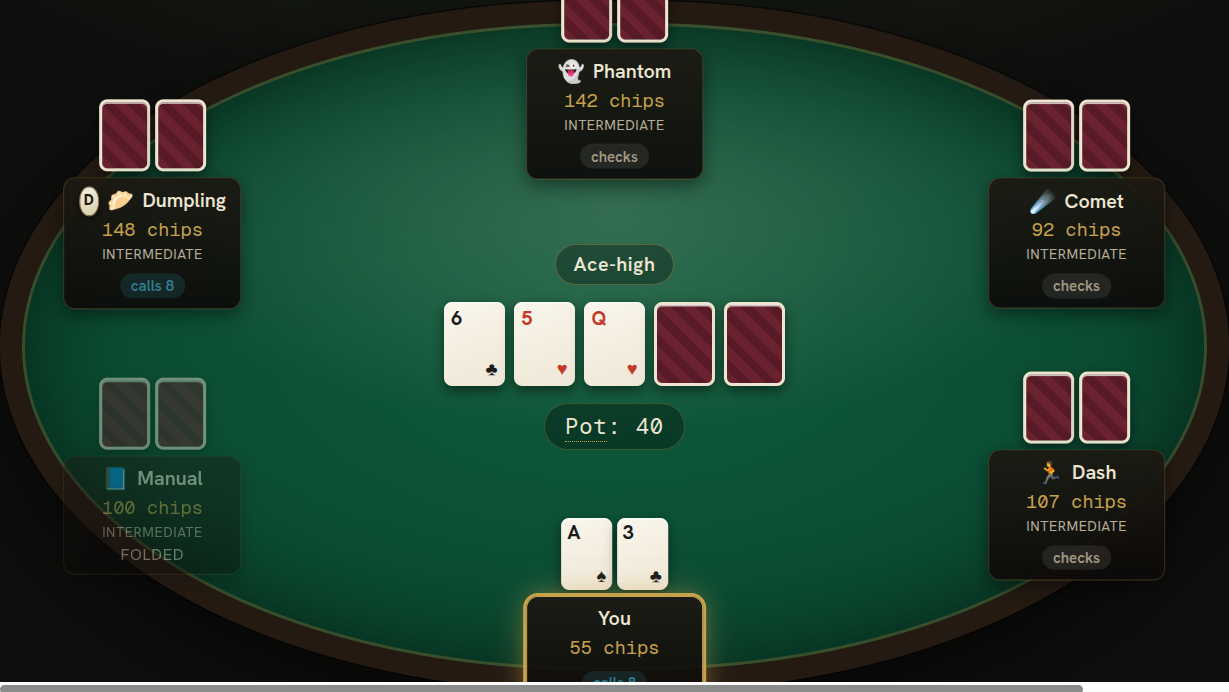
- Your cards are at the bottom, in front of the seat marked “You”.
- The shared cards are in the middle, revealed as the hand goes on.
- Above the shared cards, a small label shows your current best hand (e.g. “Pair of Kings, Ace kicker”) so you always know where you stand.
- The pot (chips up for grabs) is shown in the center.
- Each opponent has a nameplate with their chips, and a small tag showing their last action (bets, calls, folds).
When it’s your turn, the action buttons light up at the bottom. Take your time; nothing is on a timer. You can also set the speed (Slow / Normal / Fast) to control how quickly the opponents act.
Betting & bet sizing
On your turn you’ll see up to four choices:
- Fold: give up the hand and lose nothing more.
- Check: stay in for free (only when there’s no bet to match).
- Call: match the current bet to stay in.
- Bet / Raise: put in more chips. The button shows the total you’re raising to.
When you choose to raise, a sizing panel appears:

- An amount box you can type into, with −/+ buttons to nudge it.
- A slider to drag between the smallest legal raise and going all-in.
- Quick-size buttons that fill in common sizes for you and show the exact chips, for example “½ Pot”, “Pot”, or “3× open” when facing a raise. Each shows how it’s measured so the numbers never feel like a mystery.
Want to practice sizing on your own? Go to Account → Preferences and turn off Smart bet sizing. The quick-size buttons disappear, leaving just the slider and amount box, so you have to work out the size yourself.
Chips & your bankroll
All chips are play money. There’s no real cash anywhere in the app. Two numbers matter:
- Your bankroll: your total chips, shown in the top bar. It carries across sessions.
- Your table stack: the chips you sit down with at a given table (a buy-in). You take winnings with you when you leave.
You can’t go broke: if your bankroll runs low, a free daily top-up refills it back up to 10,000 chips. Play as much as you want.
Your opponents
The players you face are “villains”: named characters who each play a fixed way. One might be a wild bluffer, another a rock who only bets the nuts. Crucially, their style is never shown to you. You have to figure it out by playing them, just like at a real table.
Over time the app builds you a dossier on each villain: how often they put money in, how aggressive they are, how often they fold. Visit Villains to see your reads and add your own notes.
Getting coached
There are three layers of feedback, from quick and automatic to deep and conversational:
Live coach free
A toggle by the table. When it’s on, you get a small pop-up the moment you make a clear mistake, such as “that fold is too tight” or “this call doesn’t have the odds”. It’s instant, based purely on the math, and free.
Objective analysis free
On any hand’s review page you’ll find a mechanical breakdown of each decision: pot odds, position, defense frequency, sizing. No opinions, just the numbers behind whether a play was good, okay, or a mistake. Free on all your hands.
AI coach paid
The AI coach reads the whole hand (your cards, the board, your tendencies) and explains it like a patient teacher. Two ways to use it:
- A written review of the hand, street by street, with what to do differently.
- A back-and-forth chat where you can ask follow-up questions. It asks you questions too, to make you think rather than just handing over answers.
The AI coach works on your own hands only, and it’s the one paid feature; everything else above is free. Had a great chat you want to keep? Hit ☆ Save in the chat window and it’s stored under Chats and on that hand’s page.
Reviewing your hands
Every hand you play is saved. My Hands lists them, grouped into blocks by table so a session reads as one story. From here you can:
- Open any hand to replay it step by step and read the analysis.
- Search and filter: by your cards, position, whether you saw a flop or showdown, and more.
- Favorite a hand (the ★ star) to bookmark it, handy for hands you want to revisit or ask the coach about later.
Preflop charts
Charts shows you exactly which starting hands to play from each position, the same reference the coach grades your preflop decisions against. Pick a position and a situation (opening, facing a raise, facing a 3-bet) and the grid lights up the hands to raise, call, or fold. A great way to build solid preflop instincts.
Drills
Drills are focused practice. Instead of random hands, you pick a scenario (say, “defending the big blind against a 3-bet”, or “playing a flush draw on a wet board”), and the app keeps dealing you that spot so you can rep it until it clicks. Drills don’t touch your bankroll, so practice freely.
Explore & sharing
Explore is a feed of interesting hands other players have chosen to share. Open one to replay it, read the analysis, and leave advice in the comments.
You can share your own hands too. On a hand’s page, set its visibility and (optionally) add a question like “was my river call bad?” to invite feedback from the community.
Your dashboard
The Home page is your dashboard. As you play, it fills in with your results and, more usefully, your leaks: recurring mistakes the app spots in your game (for example, folding too much preflop, or over-betting rivers). It’s the fastest way to see what to work on next.
Settings
Your preferences live at Account → Preferences:

- Smart bet sizing: on by default. Turn it off to hide the quick-size buttons and size every bet yourself.
- Live coach: the in-game mistake nudges. Turn on for guidance, off for a quieter table.
Unfamiliar words
Poker has a lot of jargon. Anywhere in the app you see a word with a dotted underline, hover over it (or tap on mobile) for a plain-English definition. It works on the coaching text too, so you can read a review without a poker dictionary open.
FAQ
- Is any of this real money?
- No. Everything is play money for practice. You can’t win or lose real cash.
- Can I run out of chips?
- Not for long. A free daily top-up refills your bankroll to 10,000 chips.
- What’s free and what’s paid?
- Playing, the live coach, the objective analysis, hand history, drills, charts, and sharing are all free. The AI coach (written review and chat) is the one paid feature.
- Can the coach review other people’s hands?
- The AI coach only works on your own hands. You can still read the free analysis on shared hands.
- Do I have to know poker already?
- No. Start playing, turn on the live coach, and lean on the hover definitions. The whole point is to meet you where you are and take you further.
Ready? Sit down and play →